
In your POS SETTINGS, you can create products/merchandise for selling through your POS. (Administrator >> POS Settings)
Click on the PRODUCTS tile and then + Add Product.
Products require a Category (e.g. Drinks), Sub-Category (e.g. water) and Supplier (e.g. Asahi). You can create all three of these as needed if they don't already exist.

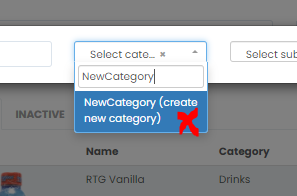
Type the product name in and select a Category from the drop-down. If you need to create a new category, type the name in the field and click in to the BLUE field to save it.
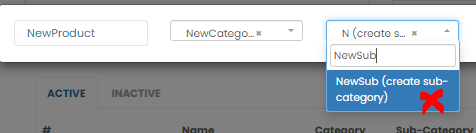
Select a Sub-Category from the drop-down. If you need to create a new Sub-category type the name in the field and click in to the BLUE field to save it.
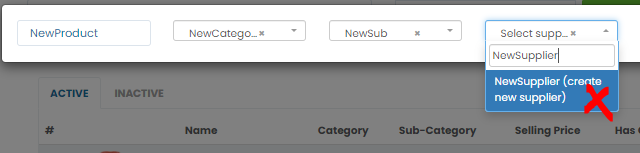
Select a Supplier from the drop-down. If you need to create a new Supplier type the name in the field and click in to the BLUE field to save it.
Enter the Sell price and click the Add Product button.
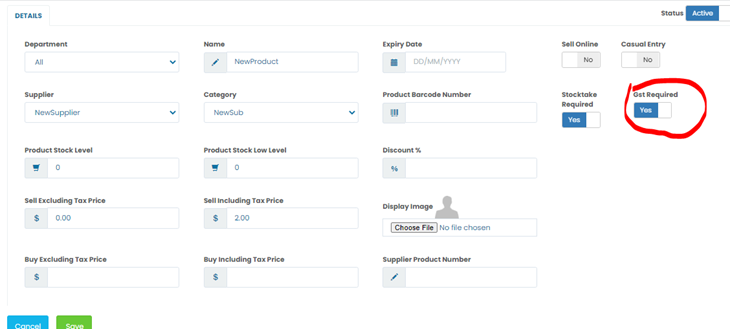
Find the product you have just created and edit/configure as required. The default setting for products is gst inclusive. If you are adding Water to the system toggle off the GST button. Enter an initial Stock Level and then Save. This product will now be visible in your POS screen.
Comments
1 comment
is there a way to sell products online?
Please sign in to leave a comment.